
Run your business
on complete autopilot.
Cut no-shows with deposits taken at booking. Automate your WhatsApp reminders. Collect payments directly into your own account — zero commission, ever.
14-day free trial · No credit card · See pricing
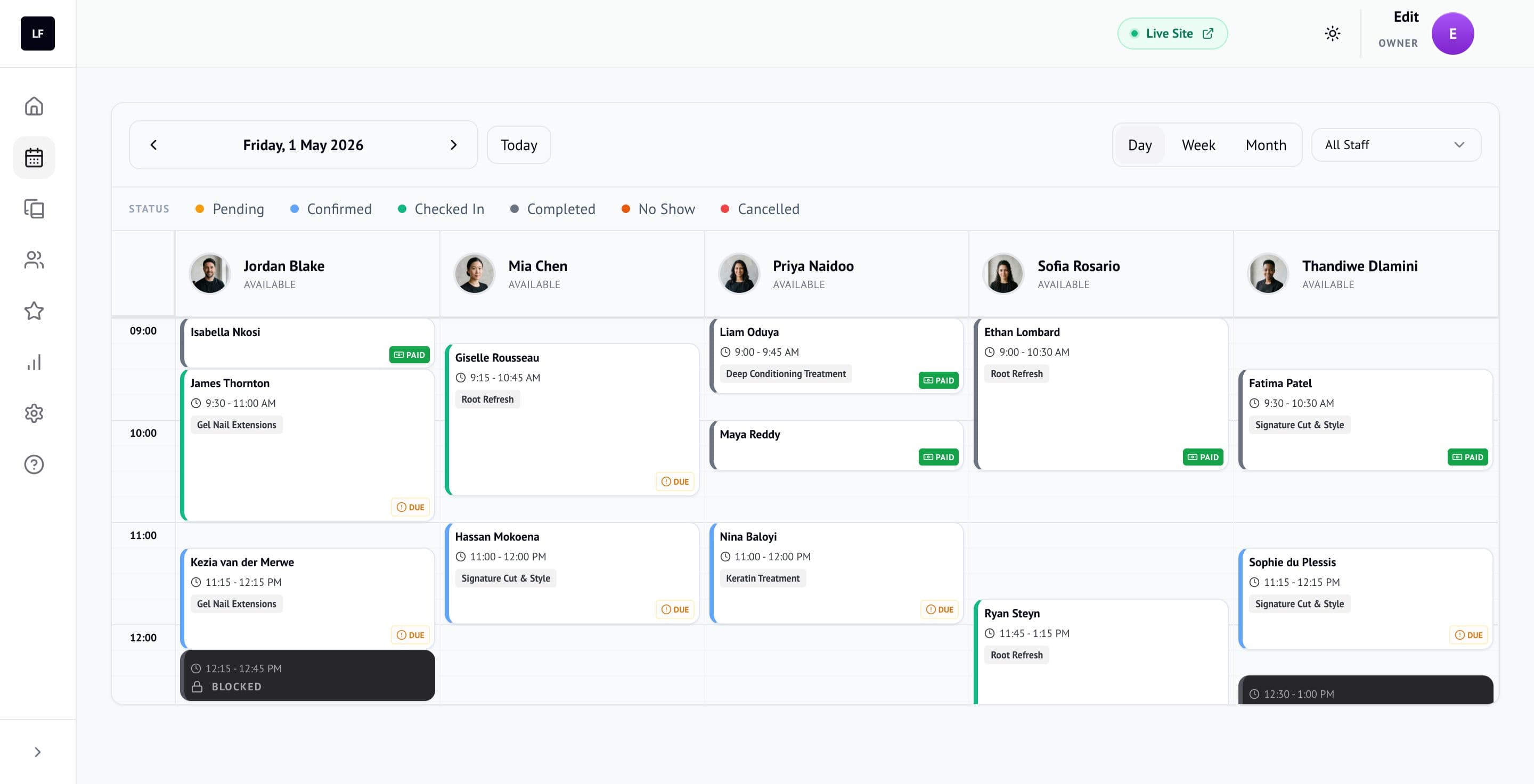
Example calendar
Built for appointment businesses like these
Everything your business needs to win.
Not just software. An unfair advantage.
No-Show Assassin
Protect your time with smart upfront deposits. Clients secure their slot instantly — you get paid before they even walk in.
Optional — only needed if you want to collect deposits. Requires a free PayFast Merchant account.
Deposit Secured
Aisha Petersen • Balayage & Toner
R 350.00
2 min ago
Deposit collected • Appointment confirmed
Example
Google Review Booster
Automatically ask clients for a review after their appointment — add your Google review link and they go straight there.
127 Google Reviews
Example
Native WhatsApp
Automated reminders, confirmations and cancellations — sent through WhatsApp, where your clients already are.
WhatsApp • LuckyFlo
Reminder: your appointment is tomorrow at 14:00. Tap Confirm or Reschedule.
Delivered • 14:32
Example
Zero Admin
Drag-and-drop calendar, automated reminders, payment collection. All on autopilot.
12
Bookings Today
R 4,200
Revenue
98%
Show Rate
4.9
Rating
Example
Your PayFast account.
Your money. Every cent.
Most platforms act as the merchant. They collect your clients' payments, take their cut, then pay you out days later. LuckyFlo works differently.
You connect your own PayFast Merchant ID. Client deposits go directly into your account the moment a booking is secured. LuckyFlo never touches your money.
PayFast is only required if you want to collect upfront deposits via the No-Show Assassin. Everything else in LuckyFlo works without it.
- 0% commission on every booking
- Deposits go directly to you — not us
- Your PayFast dashboard, your statements
Per R1,000 collected from new clients
Commission-based platforms
Marketplace new-client commission
−R200
their cut
LuckyFlo
Flat monthly fee, BYO PayFast
R0
zero commission
PayFast's own processing fees apply and go to PayFast, not LuckyFlo. We earn nothing from your transactions.
How we stack up
Global platforms aren't built for how South African service businesses actually operate. Here's the difference.
Feature
Others
LuckyFlo
New client commissions
Fee taken from marketplace bookings
Payment gateway
Who holds your money
WhatsApp automation
Booking confirmations & reminders
No-show deposits
Protect your time automatically
Data ownership
Your client list, your history
Based on publicly available pricing from leading competitor platforms as of 2025. Marketplace commission rates vary by plan and region.
Simple, SA-Friendly Pricing.
No hidden fees. No long-term contracts. Flat monthly in rand.
The maths
One saved no-show can pay for your month.
Reminders and deposits taken at booking mean fewer empty slots. For example, one deposit that protects a R1,000 colour appointment from a no-show covers the Solo plan for the month, with change to spare.
+R1,000
No-show prevented
−R290
Solo plan / month
+R710
Net in your pocket
Example
Every plan includes
Solo
For the solo pro who runs their business on WhatsApp
- 1 Staff / 1 Calendar
- 100 WhatsApp Credits / mo
Team
The complete operating system for small teams
- Up to 5 Staff Members
- 300 WhatsApp Credits / mo
Ultimate
For established businesses running at full capacity
- Up to 20 Staff Members
- 600 WhatsApp Credits / mo
Enterprise
For large groups and multi-location brands
- 20+ Staff Members
- Custom WhatsApp Quotas
1 WhatsApp credit = 1 automated WhatsApp message · Top up any time · Credits refresh when your plan renews
Frequently Asked Questions
How does the free trial work?
You get 14 days to try LuckyFlo with your own business, and no credit card is needed to start.
What is a WhatsApp Credit?
One credit sends one automated WhatsApp message, such as a confirmation, reminder or cancellation. Your plan includes a number of credits, they refresh when your subscription renews, and you can top up from your dashboard at any time.
Do I need to sign a contract?
No. Monthly plans have no contract. You can cancel, upgrade or downgrade from your dashboard.
Are my clients' payments secure?
Payments go through your own PayFast merchant account. LuckyFlo never sees or stores your clients' card details — that stays between your client and PayFast.
Can I bring my existing client data?
Yes. Import your client list yourself from a CSV file in the dashboard (Clients → Import).
Does LuckyFlo take a cut of my bookings?
No. You pay a flat monthly subscription. What your clients pay goes into your own PayFast account.
How does LuckyFlo handle POPIA?
Under POPIA you are the Responsible Party for your clients' information, and LuckyFlo processes it for you as your Operator. You can download your clients and appointments as CSV files from the dashboard, and our Privacy Policy sets out what we hold, why, and how deletion works.
Where is my data stored?
On Google Cloud (Firebase), encrypted in transit and at rest. We keep daily and weekly backups, plus point-in-time recovery for the last seven days.
Your diary deserves
an upgrade.
Built for South African appointment businesses.
Get Started Free14-day free trial · No credit card · Cancel anytime